
part 19
The first play under the new name: the menu, the windows and the state of the game
After the renaming came the first real playing and remarks. A bar with nine controls became a menu, the dice rolls got a window and the game learned to save its state for a bug report. What was measured in pixels and what went wrong in the process.
After the search for the name and the renaming came what no test replaces: my playing and the remarks from it. They were not about the rules. They were about what is on the screen, where it lies and what can be done when something breaks in the middle of a game. The remarks of 23 and 24 October 2026 gave rise to two batches of changes, dozens of commits in all, and neither of them touched the rules of the game.
The numbers come from the documentation docs/DESIGN.md (chapters 46, 47 and 49), from the commits and from measurements in the browser panel; if something could not be verified, the text says so.
The bar that had nine controls
At the time of the first play, the top bar of the game carried a row of buttons and checkboxes: Numbers, Hints, Statistics, Log, Legend, Sound, Settings, Restart and Home. On a computer it looked like equipment, on a phone like a crush. A day earlier the review fixes had shown that at a width of 375 px the tools took 299 px and the round number shrank to the letter "R" (DESIGN §46).

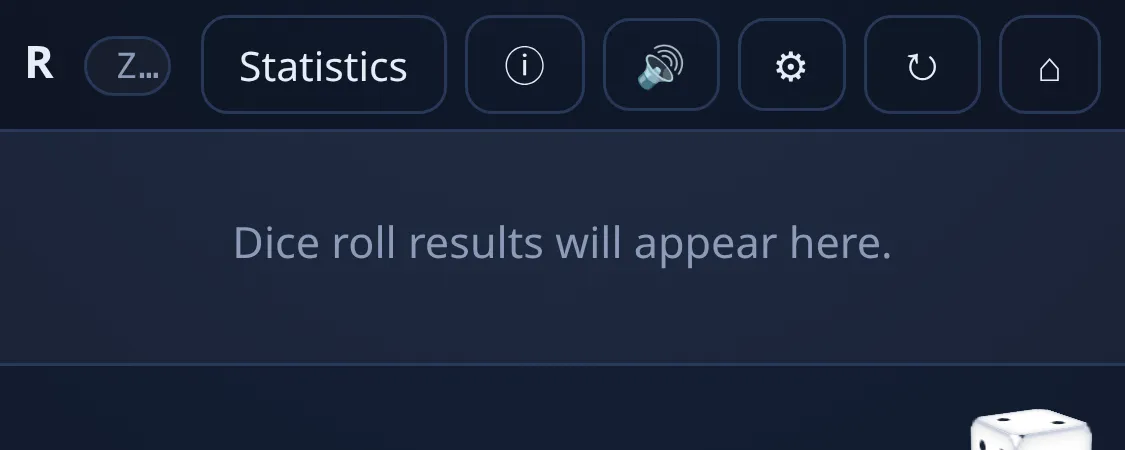
The solution was not to shrink the font. The bar now has the round and the seed on the left and six buttons on the right: 🎵 music, 🔊 sound, ⚙ settings, ↻ restart, ⌂ home and ☰ Menu. Everything else (Numbers, Hints, Dice rolls, Rolls in a window, Statistics, Log, Legend, Rules of this game and Save a snapshot) was moved into the drop-down menu of the last button (DESIGN §47.1).
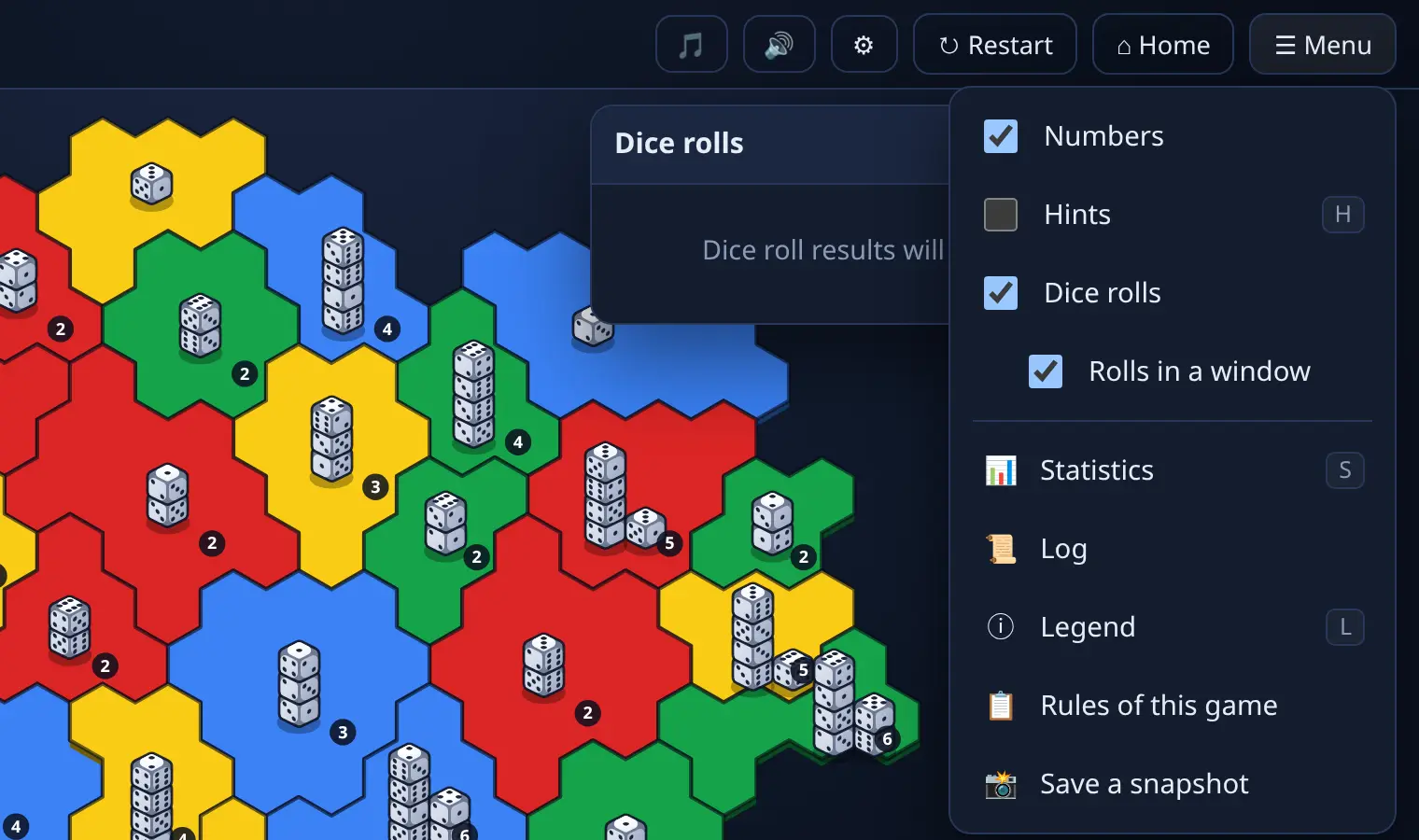
The number that decided here is not the number of buttons but their width. Six buttons of 40 px fit into 360 px in the same way as five fitted there before. The bar stayed 44 px high and the canvas with the map still has the same size on 360 × 640 px, 360 × 329 px, which was measured in the browser before the change and after it.
The menu has one detail that showed itself only while working on it. A button in the menu closes it, a checkbox does not, because the player often switches several things in a row. In addition, writing the tests revealed an old bug that had nothing to do with the menu: the space bar on a checkbox in the bar ended the turn, because the game surface took the space bar from the focused checkbox, cancelled its default action and the turn ended. The menu now offers all keys to itself first (HudMenu.key(e)) and only if it does not handle them does the game get them.
Rules of this game
Another remark was about the difference between "the rules of the game" and "the rules that apply right now". The game has many settings and with the mode Surprise me (random settings) the player did not know what had actually changed compared with the usual. The item Rules of this game in the menu opens a window with the settings of the game in progress, in groups as in the editor, without the appearance, and marks the unusual values (DESIGN §47.2).
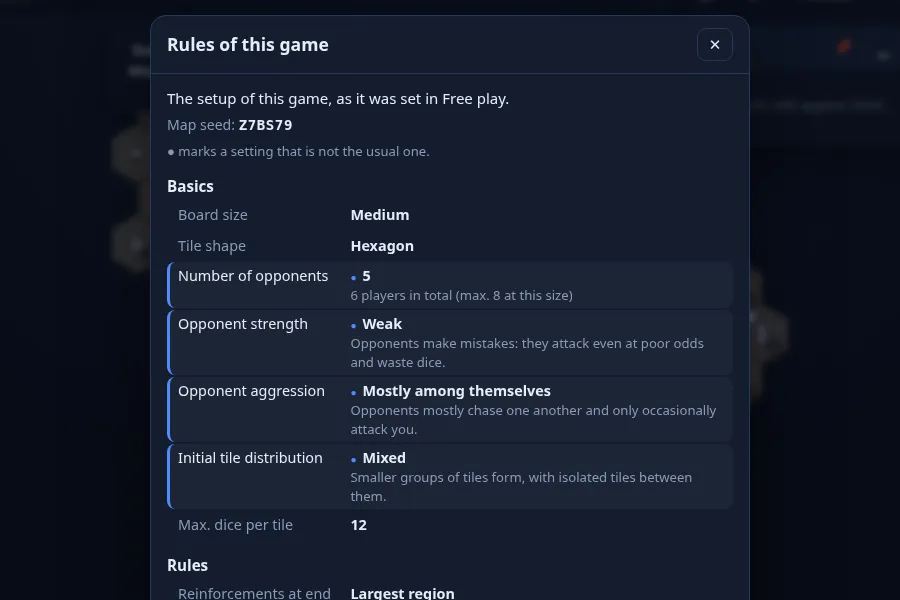
The window speaks according to the kind of game: Principalities[1] say that their rules are fixed, Free play "as it was set in Free play", the daily challenge the rule of the day, a mission or a minigame its goal and only the settings in which it differs. In a puzzle and in a lesson there is no window, because their task and the trainer already tell the rules.
This includes the message in the mode Surprise me. Measurement showed that one surprise changes as many as 13 settings. A list as long as a dozen would cover the map, so at the start the game lists the first four and adds "more in the menu: Rules of this game". It is a decision about how much text fits above the board, not about what is important.
A smaller technical note: the item got the identifier #btnGameRules and not #btnRules, because that one already belonged to the button "Rules & scoring" in the editor. Such collisions of identifiers cannot be caught otherwise than by searching the code and the tests.
The music window and a slider that must not change the volume
Live music had its switch and style hidden in the settings. The new music window (🎵) shows it as one big switch and under it the state: on, it joins at the next turn, muted by the sound switch, off, or unavailable, with the reason (fog of war, a puzzle, a game without a record, a finished game). If the guard switches the music off because it was slow or ended with an error, the window has a button to switch it on again. The style (eleven buttons) and the density are behind the cogwheel in the header of the window (DESIGN §47.3).
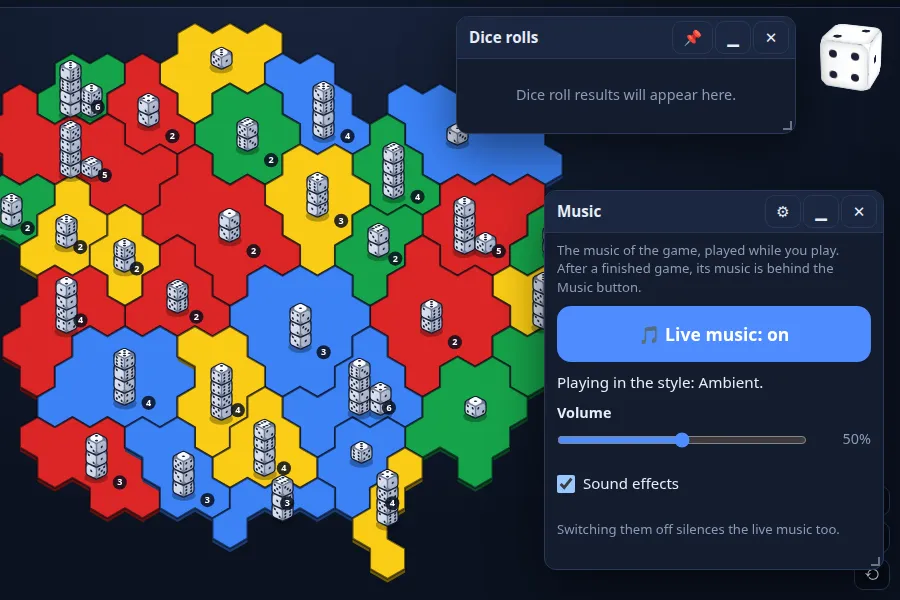
The most delicate was the change of the volume. Until then there were three words (quiet, normal, loud), now a number 0 to 100 with a slider. Old players, however, have the words saved and the new number has to sound the same:
- The middle of the slider, 50, is "normal". One step of the slider is 0.2 dB, the whole slider has ±10 dB and 0 is silence, so 25 and 75 are exactly −5 and +5 dB, by how much the old words differed.
- Measured with the tool
tools/loudness.jsat the bed of the music: the original values 0.018 / 0.032 / 0.056, the new curve gives 0.0180 / 0.0320 / 0.0569, that is within 0.15 dB. - A word is changed into its place when loaded (25, 50, 75), a number into a whole number on the slider, anything else into the middle, and normalisation of a hostile value never throws an error.
The proof of the migration was not from hand-written data. The tool tools/music-volume-fixtures.js made the settings and backups of four players with the old code (the default settings and each of the three words) and the new code loads them from the storage and from the backup. A test verifies that the word was changed into a number, no other setting changed, and that a second round of saving and loading keeps the number. It is the same procedure as in the renaming of the backup in the article about the name.
What was not verified: the upper end of the slider (+10 dB against the bed) was not measured as a stream of sound against the effects, because tools/loudness.js needs Chromium, which does not run in this environment. Only the three old points are measured.
Where the windows sit
The two windows that the player opens most often are the statistics and the dice rolls. The remark was simple: the statistics should be at the top left and the rolls should not get in the way. Two "simple" requirements, however, led to a measurement.
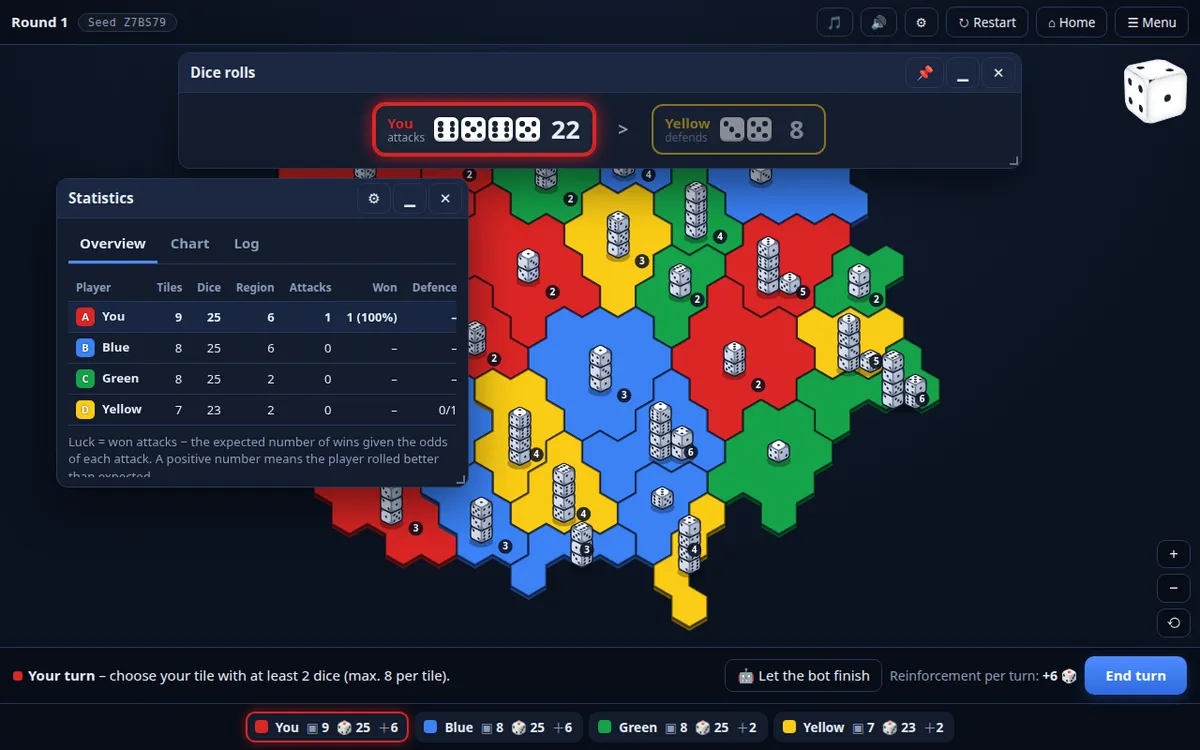
The statistics now have the first place x 60, y 100 (size 440 × 330 px). Until now they were at the right edge, 96 px from the top, that is exactly across the Avatar[2]. The value x 60 leaves the column of the opponents' icons visible. The first version had y 190, because the window of the rolls stood at the top centre and covered it; after the placement of the rolls window was changed it returned to the requested y 100.
Rolls in a window is a new way to show the dice of both sides in an attack. The strip above the board took 86 px of the height of the map. The window takes room only where the player wants it, can be made smaller and bigger with all eight handles and with keys, and remembers its size. The map thus grows by those 86 px and the window, which the player moves, can cover the first row of tiles.
The first place of the rolls window turned out bad after the first play: it was a window 900 px wide at the top centre and it covered about 21% of the area of the map itself, about 23,000 square pixels, 3 to 8 territories, on all three measured screen sizes. Narrowing the window did not help (640 px covered 29% of its area, the same 23,000 px²), because the top centre is exactly the top of the map. Only the corner next to the Avatar helped, because the map has the shape of a hexagonal blob and leaves the corners empty.
The rule of the first place (RollWindow.firstPlace) considers two shapes of the window (640 × 124 px side by side or 340 × 209 px one below the other) and several places. It never covers the icons of the opponents or the die of the Avatar, and as long as possible it leaves out the first place of the statistics. Of the rest it picks the one that covers the least map (measured by sampling every 6 px against the outlines of the territories, also with zoom and shift). A place that the player has set is used as it is, and nothing is calculated.
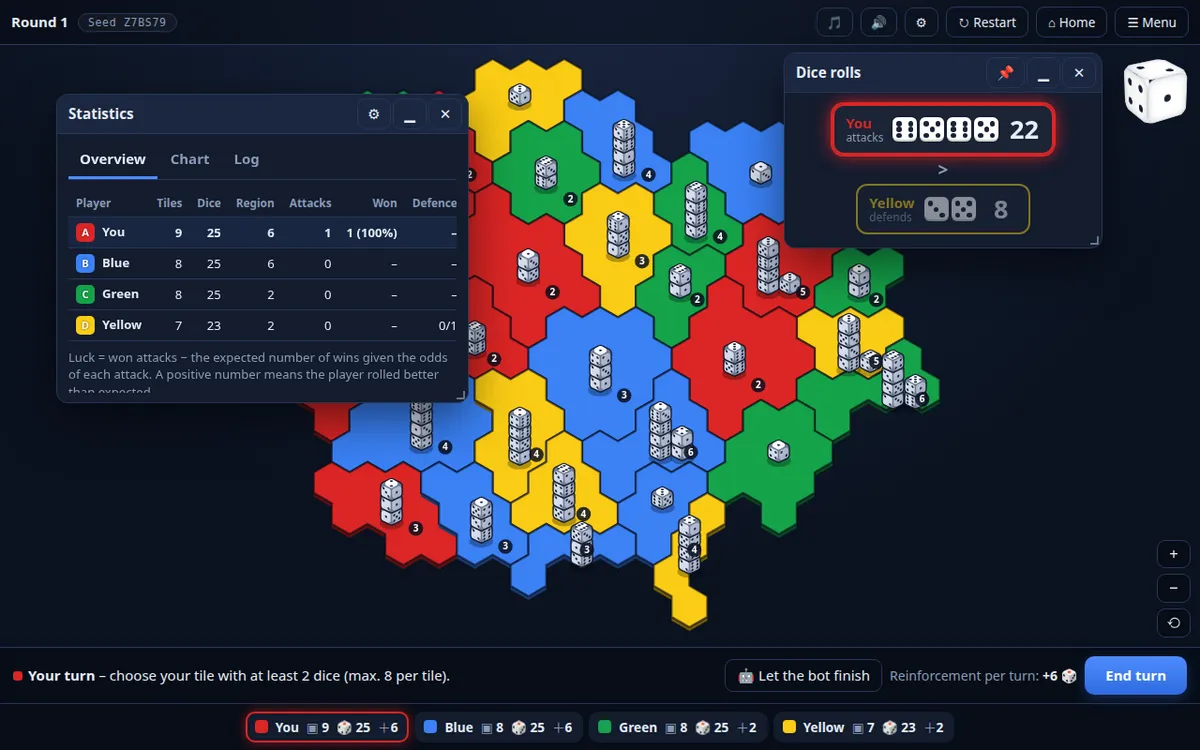
| screen | rolls window | covered (empty / with dice) | before |
|---|---|---|---|
| 1913 × 963 | side by side, 640 × 124 px, to the left of the Avatar | 0 / 0 px² | about 23,000 |
| 1280 × 800 | one below the other, 340 px | 360 / 5,500 px² | about 23,000 |
| 1024 × 768 | one below the other, 340 px | 5,000 / 20,000 px² | about 23,000 |
On 1024 × 768 the map cannot be freed: the side bands are 169 px, the narrowest window 240 px, so the top of the map remains. The documentation names this honestly and leaves it to me whether, on screens below about 1100 px, the default should be the strip (the price: 86 px of height) or a reserve of room at the top (the map would shrink by a fifth).
A jump of six pixels
The rolls window also has a small bug that no test would see until it was measured. The window adapts to the height of its content until the player grabs the edge. The content is 118 px (the resting text) or 124 px (with dice), that is less than the common minimum of the windows, 130 px. At the first grab the window therefore jumped to 130 px, by 6 to 12 px more than the content made it.
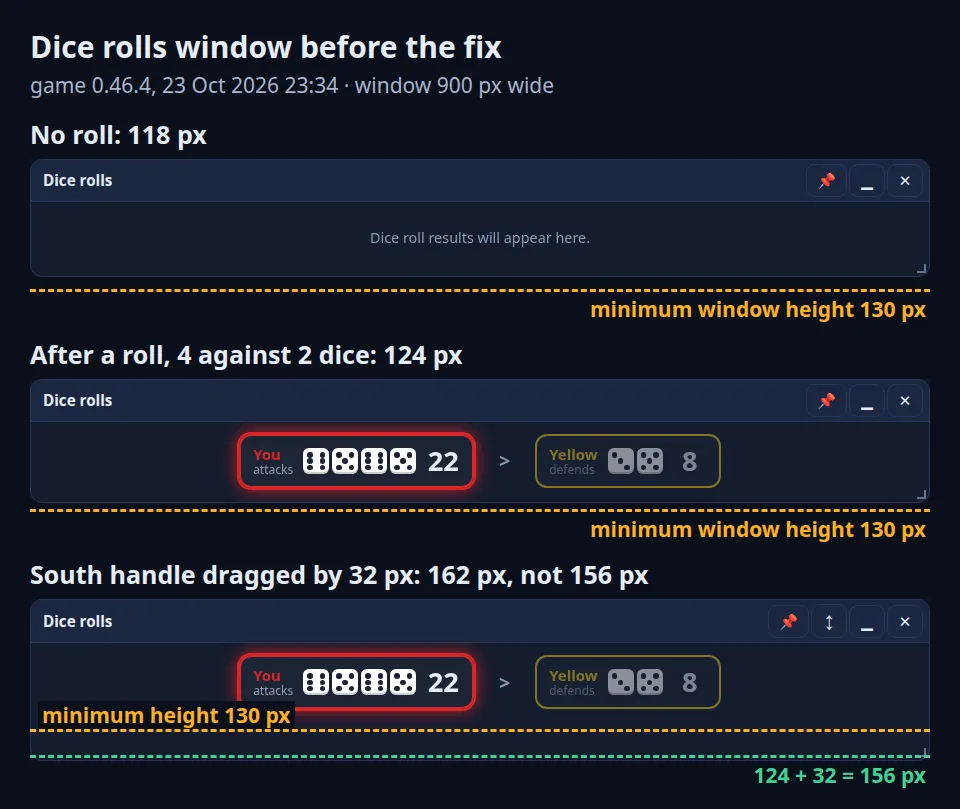
The fix did not change the minimum of all windows. A window that adapts to its content has a minimum of its own, 80 px (the header and a row) and the other windows stayed at 130 px. It was measured with real dragging of the mouse: the south handle moved by 32 px extends the window from 124 to 156 px (before to 162).
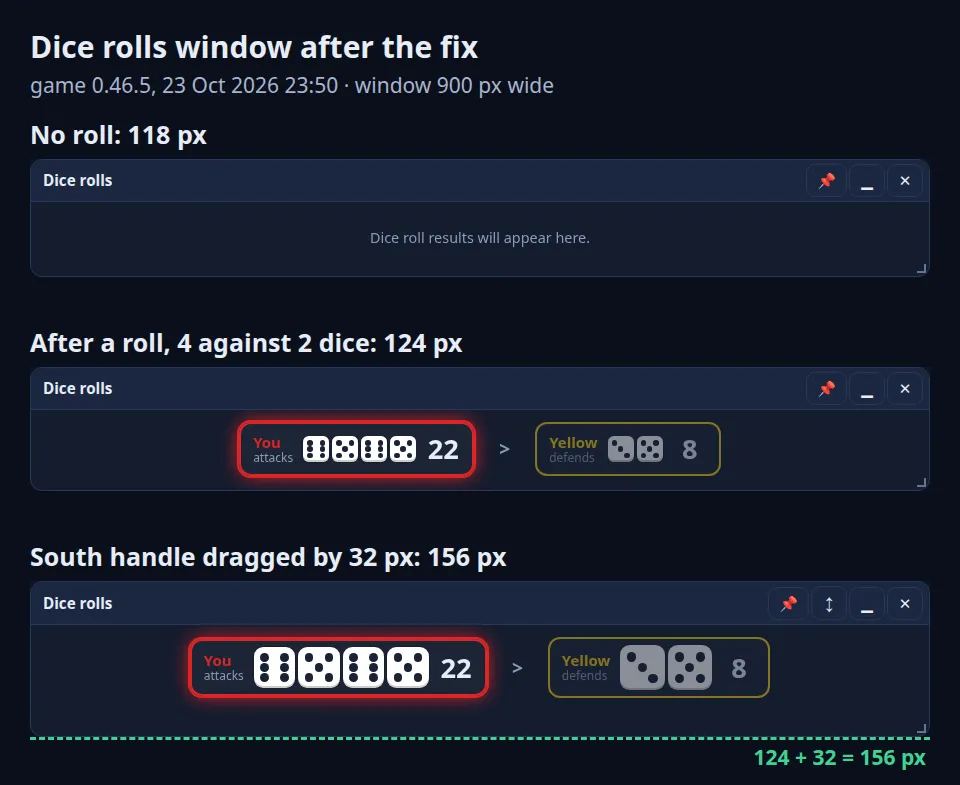
The dice in the window also grow after the player sets the height. A die is the original size (26 px) plus 0.6 of what the height gives extra, at most 1.8 times (with eight and more dice 1.3 times). A window that is just as tall as needed does not enlarge the dice, because it would enlarge itself in the process. The recalculation was measured on 40 combinations of the window size and the rolls, from 3 against 2 dice to 16 against 5, with no overflow in width.
Save a snapshot
The last remark was the most practical. If something happens in the middle of a game, the player should have a way to report it so that it can be repeated. The item Save a snapshot (in Slovak Uložiť stav hry) keeps the state at the moment it is pressed and the game goes on (DESIGN §47.6).
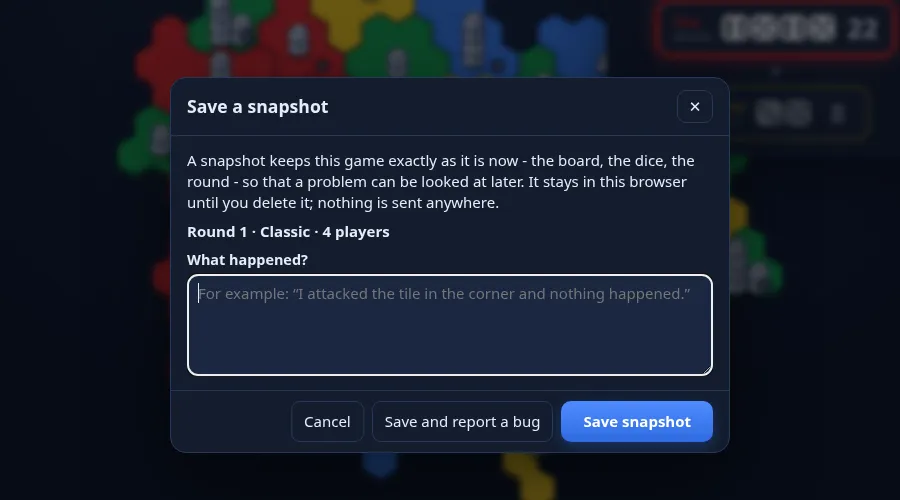
Everything needed to build the same game again is saved: the state of the game, the settings, the seed, the salt of the rolls, the round, the turn and the phase, the version of the game, the record so far, errors and the note of the player (at most 600 characters), and all of it together with a checksum. The sum is not a signature, only protection against changing or cutting the file. A typical classical game in the tenth round for four players has 24 KB, for eight players 42 KB.
Limits: my decision of 23 October 2026, at most 10 snapshots, 250 kB for one and 3 MB for a file. The content is sent nowhere, it leaves only as a file auda-wars-snapshots-….json, which the player attaches to the report. The snapshots are in a separate key of the storage, not in the profile and not in the backup: the backup should not carry the state of a game in progress.
More interesting is the opposite side, opening a snapshot. A snapshot is opened as an invalid game: nothing is counted (no reward, experience, statistic, achievement, leaderboard or record) and the end card says so. The game first saves the player's game in progress. A file that was changed or cut (a checksum mismatch) is rejected with an explanation. The snapshots of an Iron Run and of attempts for a trophy are not opened, because the data needed are not in the file.
Two things showed themselves here only in a real run:
- A fictitious DOM lies. The tests run over an artificial page in which every
$('#id')returns an empty element. The strip of the rolls#rollStripwas lost from the document when the window was closed and the real page could not find it any more, although the test passed. The module now holds the element it found and the test replaces the lookup so that it behaves like a real document. - An invalid game must not delete a saved one. The function
clearSlotSavewith the lock switched off always says that the lock is valid, and it would have deleted the player's game in progress. A game opened from a snapshot therefore does not occupy the slot and does not callclearSlotSave. Only a test caught it.
For the developer there is also the tool tools/snapshot.js: it reads a file in Node, checks the checksums, prints the note, the version, the settings, the players and the errors, and with the option --bot plays the game on twice and says whether it came out the same.
File names and backups
The renaming of the game also showed in the files that the game writes (DESIGN §47.9). A record of a game is auda-wars-<mode>-<day>-<seed>.awr.json, pictures and music auda-wars-picture-… and auda-wars-music-…, a backup auda-wars-backup-<day>.json. The extension .awr.json (Auda Wars Record) replaced .dwr.json; my decision on that was made on 24 October.
The rule was the same as in the renaming: what can be read must go on being readable. A file is read by its content, not by its extension, so the old .dwr.json, a plain .json and a file without an extension all open. The test reads files made by the old code: four games played by the old modules and written by the old writer, plus a real file that the game wrote for me before the renaming.
The backup got the label "app":"auda-wars-backup" and the note "made":{"game":"Auda Wars","version":…}, from which the player reads after a restore where the file comes from. The format number "v": 1 stayed, because the layout of the data did not change, and so did the storage keys diceWars.*. The note is only information: a restore never requires it and anything wrong with it means "without a note", not a rejection. The proof is done by tools/backup-fixtures.js: three backups made by the old code (a new player, a player with games and an unlocked achievement, a player in the middle of a campaign and an Iron Run) are restored by the old and by the new code and the resulting storage must be the same. My real backup of 23 October (5 keys) came out identical in both codes in all five.
A nasty detail, however, appeared during the restore. A backup with another language causes an immediate reload of the page, and the notice "Backup restored (made in Auda Wars …)" was created still in the old language and nobody ever saw it. Now facts, not text (the game, the version, the time) are written to the storage of the tab (sessionStorage) and the freshly loaded page makes a message from them in its own language. The facts are data from the storage, so they are read once and deleted at once, have at most 400 characters and are trusted only for 60 seconds after the restore. If the storage is not available, the message is simply not shown and the restore goes the same.
The header of the home screen
The last remark (24 October) was my sketch on a screenshot: the Avatar is the main motif, so the die belongs big on the left, next to it the title and under it the level and three currencies in one row (DESIGN §49). The sizes differ according to the window.
| window | die | level and wallet |
|---|---|---|
| wide (above 720 px) | 230 px tile | under the title, the level 250 px and three currencies in one row |
| phone (up to 720 px) | 104 px (92 px up to 400 px) | under the die and the title, three currencies in equal columns |
| low (up to 560 px) | 76 px | level and wallet in one row |
Interesting is the decision that the die on the home screen no longer folds up. Before, the die shrank to 30 px on a click and a second click opened it. With a tile 230 px big it would pull the whole header up and down under the finger that is clicking. A click therefore turns the die into a new position and still counts the "pokes" for a secret achievement. The speech of the die opens above the subtitle on a wide screen so that the header does not jump, and below the header on a phone.
The header was measured in all nine languages at the widths of 375, 768 and 1100 px. In the longest languages the currencies have 50 px instead of 36 px, and because of Portuguese at 768 px the badge of the language shows only up to 860 px (before 520 px). It was not verified with a screen reader or with a bigger magnification of the system text.
What was not touched
The common sentence of all these changes is the same: the rules of the game were not touched. The files rules.js, ai.js and engine.js stayed, tools/baseline.js and tools/calibrate.js --verify report "identical" and RULES_VERSION was not raised. These two tools are the safety net for every batch of interface changes: if working on a window changes even one decision of the AI or one roll, the output differs and the change cannot be concealed.
What I take from it
- A change of the interface is measured in pixels, not in impressions. "The window should not get in the way" turned into a number (21% of the own area, 23,000 px²) and then into a table of three screens. Without measuring, the place would only be shifted.
- A boundary breaks on the scrollbar. The threshold of 600 px seemed right until a scrollbar 17 px wide appeared in the window. The values of conditions should be compared with the real body of the window, not with a width from a sketch.
- A fictitious element does not see what a real page does. A test in which every element is present cannot say that an element was lost from the document. Such things are caught only by a real browser with real clicks.
- A migration is proved with the data of the old code. For the volume, the records and the backups, files made by the old code were used as proof, not hand-written shapes.
- A safeguard against one's own write. Opening somebody else's snapshot of a game carries the risk of overwriting one's own. The player's game in progress is saved before a snapshot is opened, and an opened game is written nowhere.
Sources and notes
- State: changes of 23 and 24 October 2026 (screenshots from game versions 0.41.7 to 0.46.7). The numbers in the article are from the documentation of the game and from its git history of those days; they were not measured again when writing. The measurements in the browser panel (the bar, the coverage of the map by the rolls window 21% and 23,000 px², the screens 1024 × 768, 1280 × 800 and 1913 × 963) are from the development of those days.
- Verified in the code of the game when writing: the limits of the snapshots (10 snapshots, 250 kB, 3 MB) and the minimum of the rolls window, 80 px. The sizes of the snapshots, 24 KB and 42 KB, are from the documentation.
- Volume: the measured values of the bed of the music (0.018 / 0.032 / 0.056, the new curve within 0.15 dB) are from the documentation; the tool
loudness.jsneeds Chromium and was not run. - The rules of the game did not change: "identical" from
baseline.jsandcalibrate.js --verifyis according to the documentation; those commands were not run.
What could not be verified: the upper end of the volume slider as a stream of sound, the output of the built package and a smoke test on a real browser (Chromium does not run in this environment), the behaviour of the header in a screen reader, and whether the chosen default place of the rolls window will prove itself for screens below about 1100 px (the decision is mine).